
ADAPT NEWS
ADAPT NEWS
Newsletter Q3 2026

New Feature!
Getting the Most Out of ADAPT’s New Clause Library
By Mark Hevrdejs, JD, LL.M and COO for ADA Platform Technology LLC.
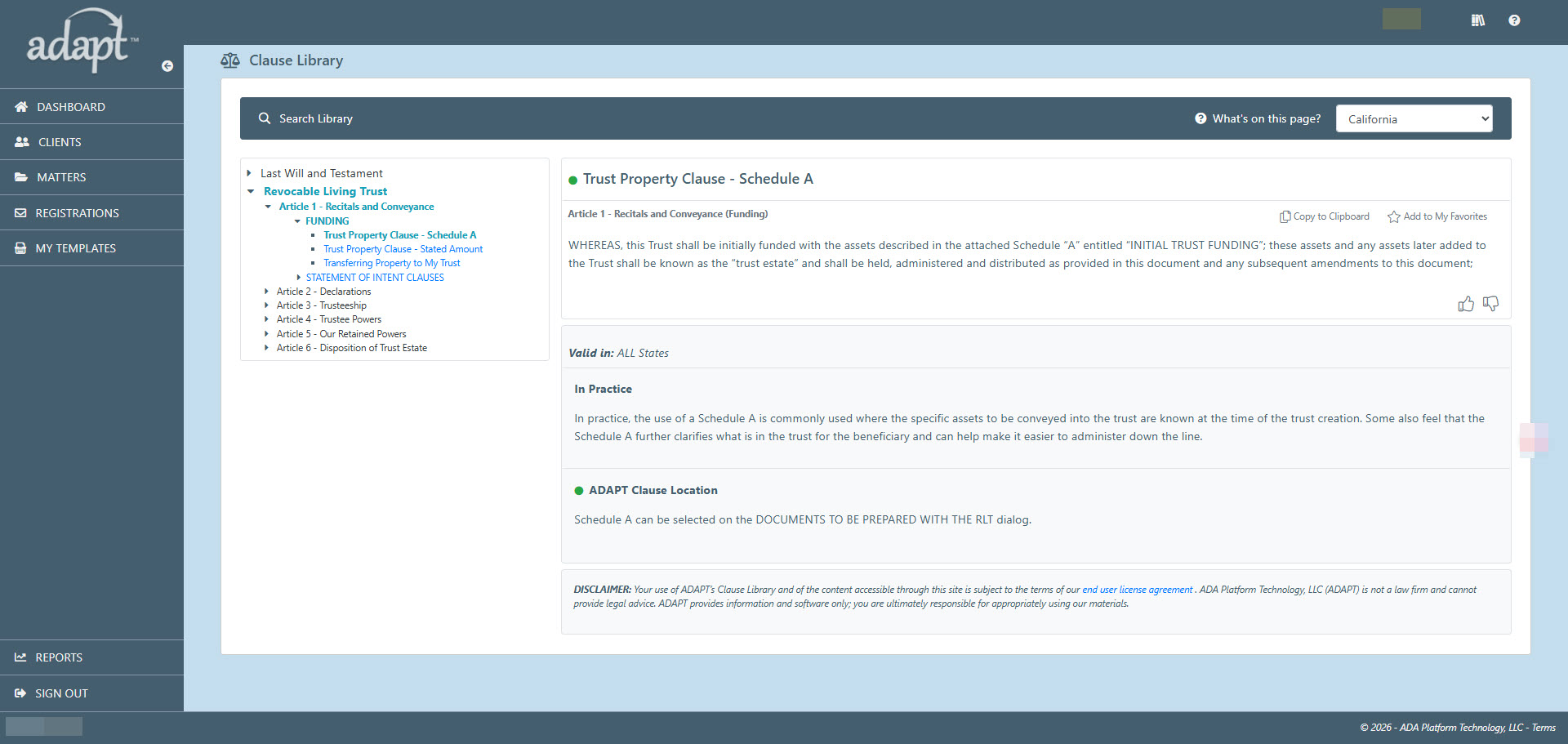
Earlier this summer, ADAPT introduced a new feature as part of its drafting solutions – the Clause Library. This new feature includes access to hundreds of will and trust clauses that can be incorporated into your documents post-assembly as well as providing you with a brief explanation of when you may want to use them.
What is the Clause Library?
The Clause Library is a repository of less frequently used clauses found in wills and trusts. These clauses, while still useful under the right circumstances, aren’t routinely incorporated by most drafters. In some cases, our legal team may also develop new clauses that cannot be immediately incorporated into existing assemblies. Additionally, over the years, ADAPT—and previously Fore! Trust software—has received suggested language from attorneys for clauses and provisions they would like to see incorporated into our document assemblies. The Clause Library provides access to these various clauses, along with an explanation of when and why you may want to use each provision. When an ADAPT template already includes a particular provision, we provide specific instructions on how to incorporate the clause into your document output using the interview process.
Why Doesn’t ADAPT Include All of the Clauses in the Clause Library in Their Assemblies?
There are any number of reasons clauses, while of value, may not be incorporated into our assemblies. Certain clauses may be relevant only in a few isolated scenarios. Other clauses, such as incentive-based distribution provisions, tend to be drafted to meet a specific client’s demands – not lending itself to a structured format that can be injected into an interview. Furthermore, other clauses are not practical for us to implement without introducing a completely new template so they may be temporarily on the back burner. Regardless of the reason, rather than keeping these clauses to ourselves, ADAPT wanted to make them available in case a user was trying to create a similar provision for a specific client to help get them jumpstarted.
So, When Would I want to Use the Library?
The Clause Library is a great resource for when you are presented with an unusual situation or clients with different types of requests. As mentioned above, should you have a client who is requesting that distributions should only be made under certain conditions designed to target the behavior of a beneficiary, you may want to look through some of the sample provisions in the clause library for ideas on how this could be presented. There are also provisions dealing with modifications you may need to make should you have a client with property in more than one jurisdiction and must coordinate with one or more foreign wills. There are also provisions dealing with specific types of assets, variations of in terrorem clauses and a whole lot more.
Sharing feedback and clauses
Part of the reason we wanted to release this feature is that it also provides us with a mechanism for helping us assess the interest level in a particular clause. This gives us a better sense of when we should add them as options to our existing assemblies. Our goal is to help you generate complex legal documents as quickly and efficiently as possible and knowing which clauses you favorite in the clause library helps us continue to evolve our template sets with direct customer feedback.
We hope you find the Clause Library useful in your practice. And, if you have clauses that you would like to see incorporated into our clause library (or directly into ADAPT’s templates) down the line, let us know. In the end, it’s the practical experience of our users that helps us improve the quality and flexibility of our templates.
From The Developers
System Performance Upgrades
By: Jeffrey Campbell, Senior Developer at ADA Platform Technology, LLC.
Many ADAPT users have built a very large client base with thousands of matters and documents. Some firms also have multiple drafters adding hundreds of new matters each day. This is great news for their businesses but could result in less-than-optimal performance from the ADAPT application.
We have made several performance updates that allow even our largest customer firms to be able to have quick access to their most recent work products. This has been done by both limiting the initial loading of data for a specific grid and by allowing the archiving of some information.
Where Will I See This?
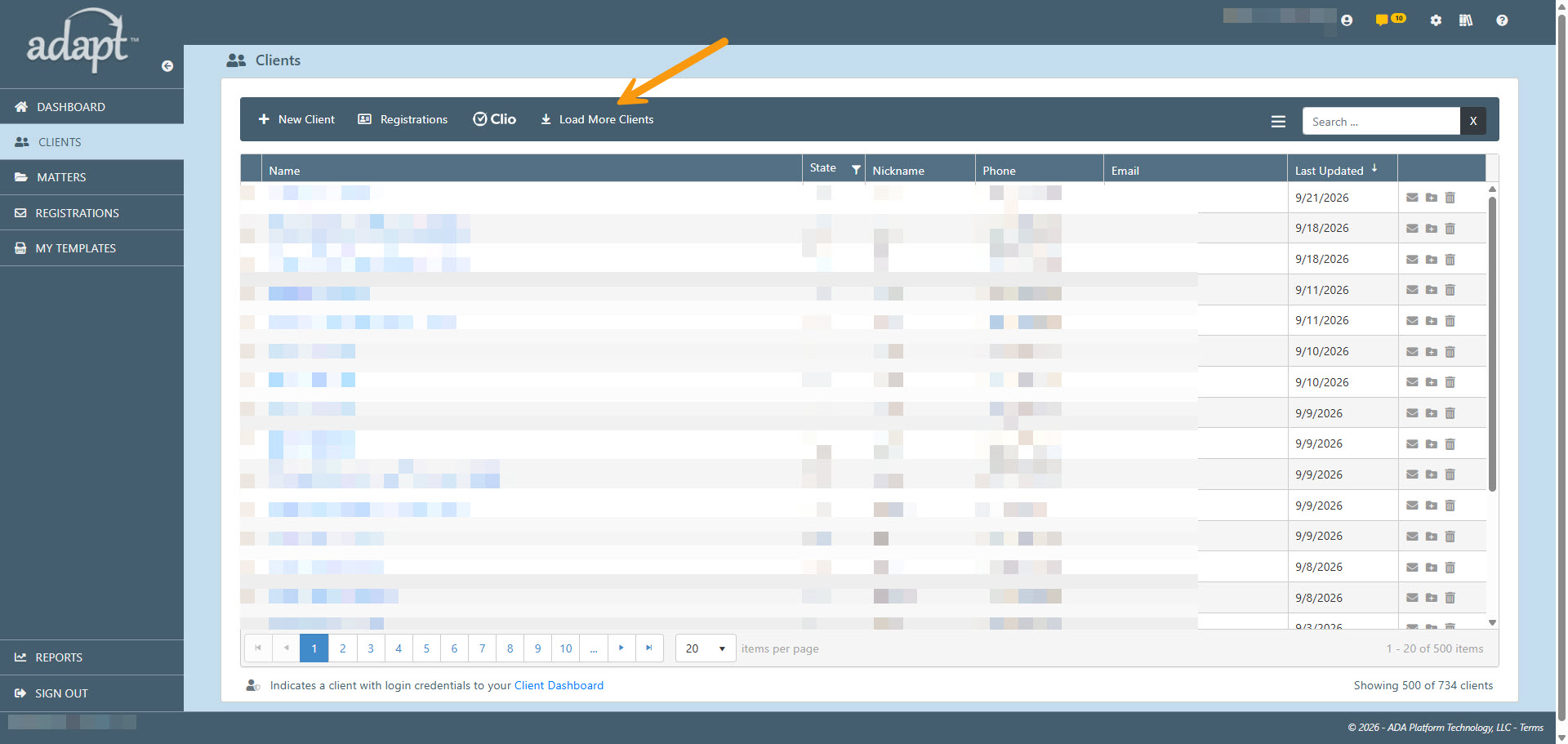
If you are new to ADAPT or have a smaller practice, you may not notice at all. For example, if you have less than 500 clients you won’t see any difference when viewing the Client list.
If you have over 500 clients, you will see that only the most recently added clients will be initially displayed. If you need to load more clients, simply click “Load More Clients” from the dark blue secondary navigation bar.
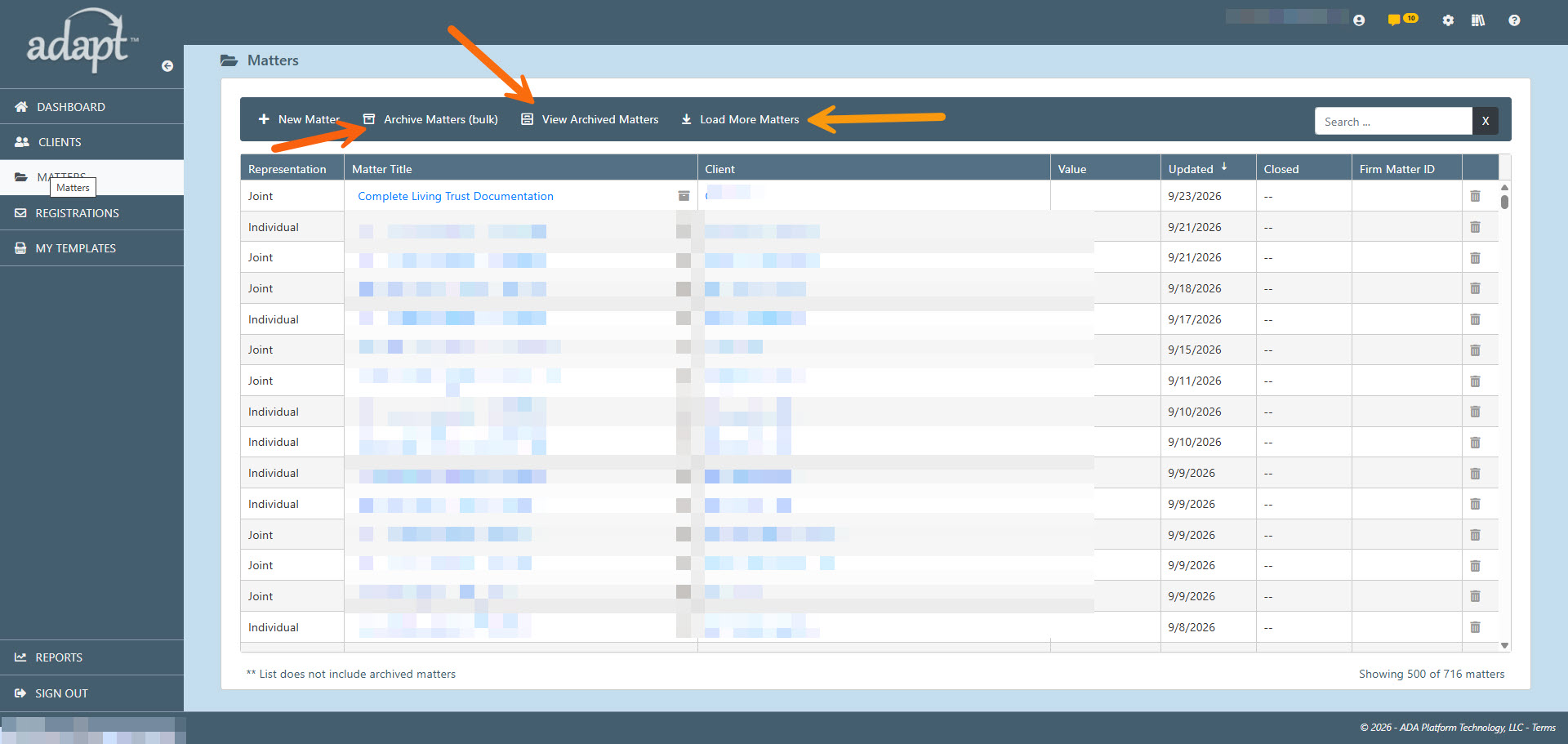
If you have more than 500 matters, you will see similar behavior as your client list. In addition, you can now archive matters so that they are not loaded into your initial view. You can either archive matters individually directly from the matter list, or you can bulk archive older matters by clicking “Archive Matters (bulk)” on the dark blue secondary navigation bar.
When bulk archiving matters, you can select a specific date to archive all matters prior to that date. You can also decide whether you want to only archive those matters that have been marked as “closed”.
When you archive a matter, it is not deleted. It just exists in the archive and is not displayed in your current matter list. A matter can be restored back to the current list by clicking on “View Archived Matters” and clicking “Return Matter to Main List” (undo icon).
The Importance of the Internet and Chrome with ADAPT
By Tommy Cimino, CTO for ADA Platform Technology, LLC.
Click, Load, Work: How the Internet and Chrome Power Your Daily Web Apps
Think about your current digital routine. Whether you are updating a project tracker, formatting a spreadsheet, or collaborating on a design layout, chances are you didn’t launch a heavy program installed on your hard drive. Instead, you opened a tab in Google Chrome, typed in a URL, and got straight to work.
We have quietly entered the age of cloud software. Tools like Google Workspace, Microsoft 365, and ADAPT have replaced traditional desktop installations. Because these applications live entirely online, your daily productivity no longer depends on how expensive your computer is.
Instead, it relies on a powerful digital duo: a stable internet connection and your web browser.
Here is a look behind the scenes at how the Internet, Google Chrome, and ADAPT work together to make your estate planning business run seamlessly.
1) The Internet: The Invisible Pipeline
Unlike old-school software that lived completely inside your computer’s hard drive, web software lives on remote servers scattered across the globe. The internet acts as an invisible, continuous pipeline connecting your devices to those servers.
Instant Auto-Saves and Zero Loss
When you type a sentence or check boxes in a cloud app, there is no “Save” button. The internet pipeline constantly sends your keystrokes to the cloud in real time. If your computer suddenly runs out of battery or the power goes out, your data is already safe.
Seamless Real-Time Collaboration
If you’ve ever seen a colorful cursor moving across your document while a coworker edits alongside you, you’ve witnessed the internet at work. The network transmits changes back and forth in milliseconds, allowing teams to collaborate across continents without creating duplicate file versions.
The Problem with a Weak Pipeline
When your internet connection drops or stutters, the pipeline narrows. This causes “latency” or lag. You might type a paragraph, but the letters won’t appear on the screen immediately because the application is waiting for confirmation from the server. While modern software can handle brief offline blips, a steady internet connection is mandatory to keep the data flowing.
2) Google Chrome: The High-Performance Engine
If the internet is the pipeline that delivers raw data, Google Chrome is the engine that transforms that data into a functional program. A browser is far more than a window to view text; it acts as a mini operating system inside your computer.
Translating Raw Code into Buttons and Layouts
Web software is delivered to your computer as blocks of complex code (HTML, CSS, and JavaScript). Chrome features a highly advanced processing engine called V8. It reads that code at lightning speed and instantly translates it into smooth menus, clickable buttons, and interactive dashboards that you can easily navigate.
Doing the Heavy Lifting (ADAPT)
In the past, software like ADAPT initially ran on computer hard drives, limiting the software to expand easily, updating frequently, and using system resources that ultimately led to computer crashes. ADAPT works best in the Chrome engine because Chrome and ADAPT are constantly working together to provide the very best coding techniques, easy navigation and robust dialogs.
The Ultimate Security Guard
Using software online introduces security risks. Chrome acts as a protective shield by strictly managing data permissions. It ensures ADAPT is securely encrypted (via HTTPS), prevents malicious sites from stealing your data, and “sandboxes” each tab so a glitch or virus in one window cannot crash your entire computer.
3) The Perfect Match: How the Internet, Chrome, and ADAPT Combine
The true magic happens when a fast network and a smart browser work in tandem to optimize your experience on the ADAPT platform.
- Caching: To save your internet bandwidth, Chrome remembers parts of the apps you use frequently—like logos, icons, and menus. Instead of downloading these pieces over the internet every single time, Chrome pulls them from your local storage instantly, making your software load much faster.
- True Mobility: Because ADAPT is powered by the internet and rendered by Chrome, your workspace is entirely portable. You can close your laptop at home, log into Chrome on a work computer or a tablet and ADAPT will load with all data available.
4) Industry Impact: Streamlining Estate Planning
The convergence of high-speed internet and Chrome execution engines has fundamentally transformed specialized, document-heavy industries, most notably estate planning.
Historically, drafting legally compliant wills, revocable living trusts, and powers of attorney required local, desktop-bound legal software that was tedious to update. Today, platforms like ADA Platform Technology (ADAPT) leverage cloud networks to completely automate document assembly. Estate Planning professionals can now deploy interactive, remote client questionnaires and dynamic interviews through Chrome.
Because the internet delivers real-time updates to compliance templates and Chrome securely handles the heavy computational processing of complex document branches, estate planning professionals can draft state-specific legal packages instantly. The combination ensures sensitive family data is safely processed in the cloud without requiring localized installations.
Summary
The next time you log into the ADAPT platform, remember that your computer isn’t doing it alone. The internet provides the continuous lifeline of data, while Chrome provides the raw processing power to make sense of it all. By keeping your connection to the internet and your browser updated, you guarantee the best possible performance from the ADAPT platform you rely on every day.
ADAPT Customer Service
Adding minor guardians
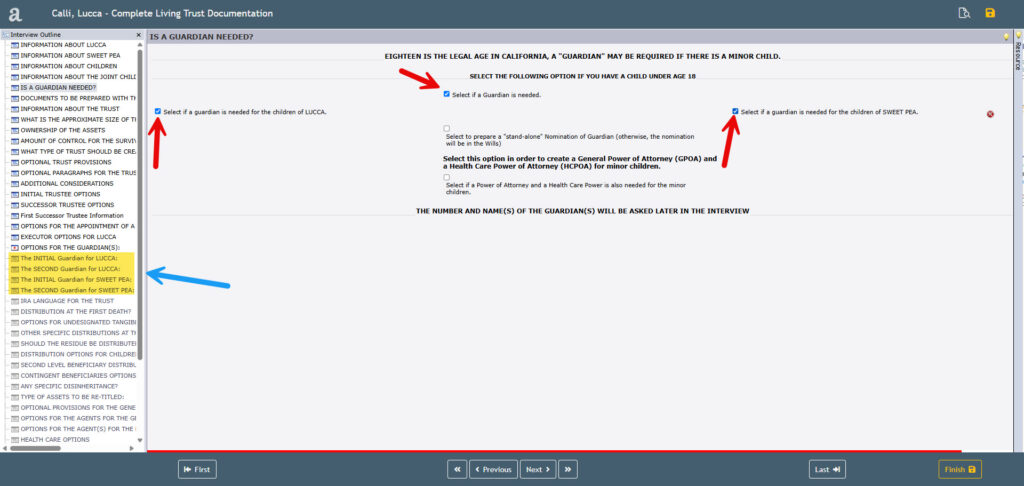
ADAPT’s customer service team receives a number of inquiries from our users about minor guardian(s) for their clients not appearing in the assembled documents or as a stand-alone document. Most of the time the reason for this issue is due to a bit of confusion that arises in the drafter’s interview. When drafting an estate plan for clients that have minor children and a guardian is a wish of that client, this should be answered on the dialog titled “Is a guardian needed?” in the interview. This screen is located just before the dialog titled “Information about the child/children”.
On the guardian dialog there are several areas that need to be answered in order for the guardian(s) and the correct documents to be included within the client’s estate plan.
Once the drafter has selected that guardian(s) are needed, the drafter must also select who the guardian is going to represent. In the couple’s interview (for a Will or Trust package) this would be making the selection for the client and the spouse if these are the wishes of the client. This means that in the event of a death of one of the spouses, the other spouse becomes the guardian of the minor. Once the option for the client and spouse has been selected the drafter will notice that the interview outline has expanded and additional dialogs about the guardian(s) have been added. Please note that if the drafter is doing an estate plan for an individual representation these steps are very similar; instead of options for a spouse the drafter can select guardian(s) in the event of the death of the client
Now that the guardian option has been selected and the client and/or the spouse have also been selected, the drafter has the option to prepare a stand-alone nomination. If the drafter does not wish to do the stand-alone nomination of guardian, then the appropriate language will be inserted into the Will. The stand-alone nomination of guardian, if chosen, will assemble as a separate document in the package. The system will generate two nominations for a couple’s package, and one nomination for an individual client.
Additionally, the drafter also has the option to draft the GPOA and Health Care POA for the minor child/children on this dialog.
From The Legal Team
Expanding ADAPT ‘s Legal Resources
By Mark Hevrdejs, JD, LL.M and COO for ADA Platform Technology LLC.
ADAPT actively monitors a number of sources to identify potential changes that can affect any of our documents and to evaluate how to best incorporate changes when they are needed. Keeping hundreds of sophisticated document templates up to date for federal and state law changes is a big challenge for every company who creates and manages drafting solutions. Some documents rarely change while others are being changed by administrative bodies annually even when there are no law changes affecting them.
How ADAPT monitors and updates law
First off, we need to know about these potential changes at the earliest point possible. We do our best to stay informed by using a service called StateNet which actively monitors and reports on activity across all legislative bodies. In addition, we also have key staff attend a variety of annual conferences such as the Heckerling institute, NAEPC and others to monitor new developments and practical considerations being discussed by various thought leaders in the industry – people like Professor Samuel Donaldson, Steve Akers and Jeffrey Pennell among others. We also have an extensive network of users who are a constant source of feedback who frequently alert ADAPT to new changes and enhancements that could be coming our way. As new items are identified they are assigned to members of our legal team to research and to develop our response and ultimately requirements for our development team.
The Work of Our Internal Legal Staff and Consultants
ADAPT has a mix of internal lawyers and external consultants who help keep our product up to date. These folks review recent law changes as well as customer feedback to evaluate what changes need to be made to the various ADAPT templates and determine how to best introduce that language. They work with our developers and QA staff to make sure the requirements associated with a change are properly executed. Some changes may be particularly complex and require our developers to modify computations used to help assign values to different variables that are used in generating subsequent interview screens as well as output. Other times it may be a simple updating of a legal citation to reflect the current citation. In any case, the legal team needs to put together requirements documents in addition to the legal language needed so that it is clear under what conditions language is to be generated and that all the needed user input is collected.
In creating new documents for the system, the legal team needs to not only produce what a document should look like but also identify all of the variations of what options need to be supported with the document logic – basically sufficient direction so that our developers know what to implement and the QA staff knows how to validate it. Even a relatively simple document like a Revocation of a Beneficiary Transfer on Death Deed, which was just added in a recent release for several jurisdictions, requires clear documentation of how the document needs to look, when and where it needs to selected in the interview, as well as identifying any additional data that needs to be captured in order to generate a completed document.
Always on the Lookout for Talent
The ability to identify and design how law and practice changes need to be incorporated into documents requires people having a mix of exceptional technical understanding of estate planning issues and an aptitude for logical reasoning and puzzle solving. ADAPT is always looking for talented individuals who are passionate about drafting and have the knack for document design and analysis. If you would like to help us improve our product and you are the type of person who feels that you have the right skill mix to work with us, let us know. We’d be happy to explore mutually beneficial projects that will ensure that ADAPT’s legal templates stay up to date and better meet our customers’ practice needs.